Howto:Htek IP phones - Htek - 3rd Party Product

Product Name
Certification Status

|
Interoperability tests between innovaphone PBX systems and end devices of Hanlong Technology Co. Ltd. confirmed the telephony functions according to the detailed manufacturer's results documented below. The tests were carried out using the firmware versions specified below. |
| This interoperability test suite was last time performed in January 2025. |
Category
SIP hardware and software endpoints
Vendor
About us
Htek (aka Hanlong Technology) was founded in Nanjing, China in 2005, with a 100% dedication to the R&D and manufacturing of VoIP endpoints. Our new UC900 Series IP phones deliver modern elegant appearance, superb sound quality and a rich set of SIP telephony features. Through a wide network of distribution partners, ITSPs and OEM partners, Htek has a market presence in more than 80 regional markets in the world.
Description
Desk phones
| UC900 Series | ||||
UC902SP |
UC902E |
UC912E |
UC921G |
UC921E |
|
- X”132x48-pixel graphical LCD with backlight |
- X”132x48-pixel graphical LCD with backlight |
- 192x64-pixel graphical LCD with backlight |
- 2.8" 320x240-pixel color display with backlight |
- 2.8" 320x240-pixel color display with backlight |
| UC902SP datasheet | UC902E datasheet | UC912E datasheet | UC921G datasheet | UC921E datasheet |
| UC900U Series | ||||
UC921U |
UC923U |
UC924W |
UC926U |
UC926S |
|
- 2.8" 320x240-pixel color display with backlight |
- 2.8" 320x240-pixel color display with backlight |
- 3.5" 480x320-pixel color display with backlight |
- 4.3" 480x272-pixel color display with backlight |
- 4.3" 480x272-pixel color display with backlight |
| UC921U datasheet | UC923U datasheet | UC924W datasheet | UC926U datasheet | UC926S datasheet |
| UCV Series | ||||
UCV10 |
UCV20 |
UCV50 |
UCV52 |
UCV53 |
|
- 5-inch 1280x720-pixel multi-point touch IPS screen |
- 7-inch 1280x800-pixel multi-point touch IPS screen |
- 8-inch 1280x800-pixel multi-point touch IPS screen |
- 8-inch 1280x800-pixel multi-point touch IPS screen |
- 8-inch 1280x800-pixel multi-point touch IPS screen |
| UCV10 datasheet | UCV20 datasheet | UCV50 datasheet | UCV52 datasheet | UCV53 datasheet |
Functions
- Initiate outgoing call yes
- Answer incoming call yes
- Hold/Resume yes
- Transfer yes
- Call waiting yes
- Do not disturb yes
- Call Conference yes
- Call Park yes
- Voice Messages Center
- Call Forward and divert yes
- Intercom (HS to HS)
- Called, calling, and connected party information yes
- Missed-call notification yes
- 1-touch speed dial yes
- Redial yes
- Zero touch provisioning, management, configuration and remote debugging via Htek Device Management System yes
- Dynamic Search of Network Based Directory yes
- BLF yes
innovaphone CTI ready
innovaphone Reverse Proxy ready
- STUN yes
- TURN = No (not needed with 13r3)
- ICE = No (not needed with 13r3)
- SIP/TCP yes
- SIP/TLS yes
innovaphone WebRTC ready
Supported Codecs
- G.722 yes
- G.711 A-law yes
- G.711 y-law yes
- G.723.1 yes
- G.729A yes
- Opus yes
DTMF Support
- SIP v1 (RFC2543), v2 (RFC3261)
- DTMF: In-band, Out-of-band(RFC 2833) and SIP INFO
Supports RFC3261 Digest Authentication Scheme (Section 22.4)
- Supports RFC3261 Digest Authentication Scheme (Section 22.4) yes
Support LDAP Phonebook
- Support LDAP Phonebook yes
For further informations please refer to this LDAP Directory configuration guide

innovaphone Contacts
Access to contact data stored in the innovaphone Contacts Application is possible by use of these configuration instructions.
Version
Product versions used for interop testing:
- Htek UC921G FW: 2.42.6.6.110
- Htek UC926U FW: 2.42.6.6.1R58
- Htek UCV50 FW: 5.42.1.7.2.2A
- Innovaphone IPVA FW:14r2 sr5 IPVA[14.2.0433]
Configuration
Htek IP phone supports multiple configurations
Phone Web Configuration:
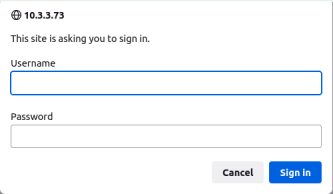
a. Press “Ok” Buttom when your phone on idle interface, you can get the IP address of the phone, input it to your PC browser.
b. The factory account password of the telephone is admin/admin. Then you can enter the Phone Configuration Interface
- Login to phone web portal:
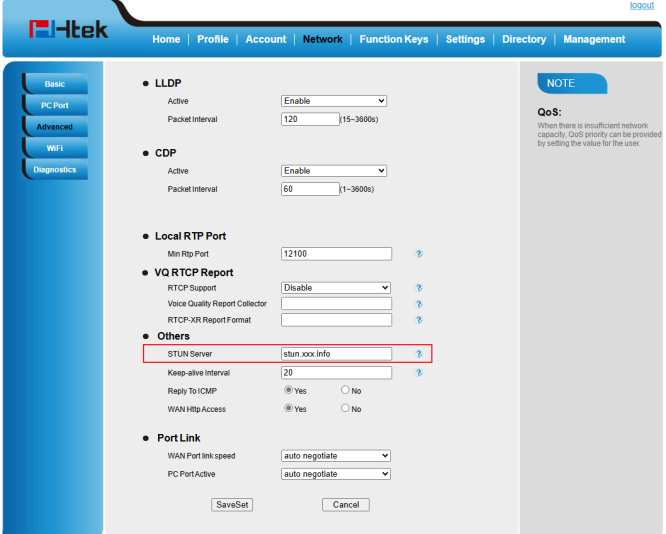
- Network setting:
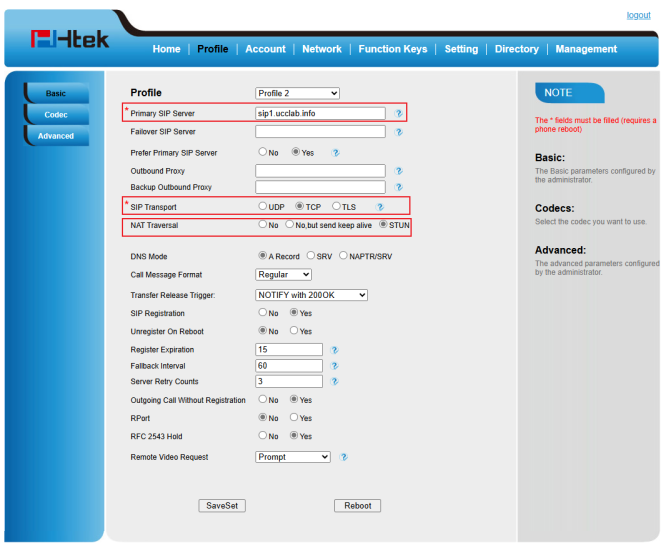
- Profile setting :
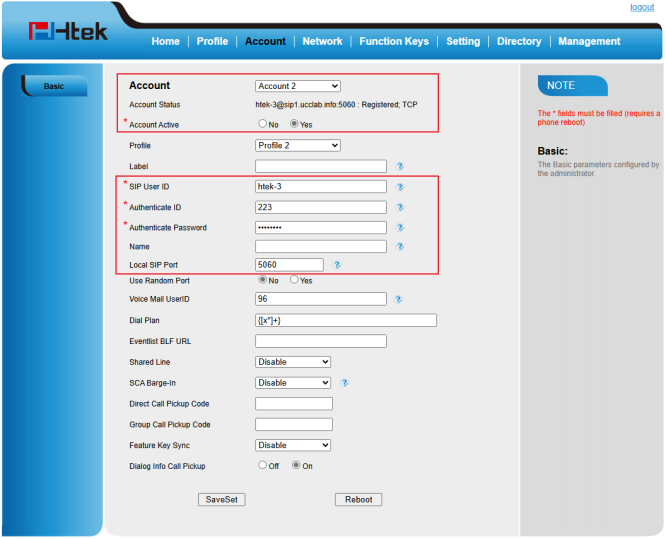
- Account setting & Register successful:


Use configuration files:
Htek phones can be deployed locally or remotely by creating a CFG file and importing the phones in different ways.

Configuration file template
As we said before, you can create a CFG file and import it to your phone to make all setting done. And here is an example for your reference:
<?xml version="1.0" encoding="UTF-8" ?>
<hl_provision version="1">
    <config version="1">
        <!--Profile1/Basic-->
        <P47 para="Profile1_Sipserver">sip1.xxx.info</P47>
        <P4567 para="Profile1_PreferPrimaryServer">1</P4567>
        <P24065 para="Profile1_DHCPSIPServer">0</P24065>
        <P48 para="Profile1_OutboundProxy" />
        <P130 para="Profile1_SipTransport">1</P130>
        <P52 para="Profile1_NatTraversal">2</P52>
        <!--Account1/Basic-->
        <P271 para="Account1_Active">1</P271>
        <P24082 para="Account1_Profile">0</P24082>
        <P20000 para="Account1_Label" />
        <P25110 para="Account1_Extension" />
        <P35 para="Account1_SipUserId">htek-3</P35>
        <P36 para="Account1_AuthenticateID">223</P36>
        <P34 para="Account1_AuthenticatePassword" />
        <P3 para="Account1_DispalyName" />
        <P40 para="Account1_LocalSipPort">5060</P40>
        <P78 para="Account1_UseRandomPort">0</P78>
        <!--Network/Advance/Others-->
        <P76 para="NW_Adv_STUN_Server">stun.xxx.info</>
        <P84 para="NW_Adv_KeepAtiveInterval">20</P84>
        <P189 para="NW_Adv_ReplyToICMP">1</P189>
        <P190 para="NW_Adv_HttpAccess">1</P190>
        <P20991 para="NW_Adv_LanLinkMode">0</P20991>
        <P20993 para="NW_Adv_WanSpeed">0</P20993>
    </config>
</hl_provision>
Any question please contact us
Support: Htek FAQ
Ticket: support@htek.com
Summary
Contact
| Company Name | Nanjing Hanlong Technology Co., Ltd. |
| Street | No.10 Huashenmiao, Huashen Tech Park, Yuhuatai District, Nanjing, China |
| ZIP/City | Nanjing, 210012 |
| Phone | 0086-25-84658050 |
| sales@htek.com | |
| Support | support@htek.com |