Howto:PBX-Designer - ITM - Partner App

Product Name
ITM PBX-Designer
Certification Status
 This App is listed due to a customer testimonial. No tests have been conducted by innovaphone.
This App has been listed August 2025.
Category
VoIP system management products
Vendor
Since 1998, we have been dedicated to innovative communication solutions and have continuously expanded our portfolio and expertise. Through consistent specialization, regular manufacturer certifications, and close collaboration with leading technology partners, we have built up a high level of expertise in select communication solutions.
As early as 2007, we established our own hosted PBX platform. This platform continued to evolve in the years that followed and was expanded into a modern XaaS cloud platform under K-Businesscom GmbH. Building on this foundation, we successfully positioned ourselves as a value-added distributor and have since supported our partners with high-performance solutions, technical expertise, and extensive project experience.
With the integration of K-Businesscom GmbH and the CANCOM Group in 2024, a strategic realignment of the voice distribution business became necessary. To ensure a clear separation between the reseller and distribution businesses and to continue offering our partners independent, focused, and specialized support, the voice distribution division was transferred to ITM GmbH in July 2024.
Building on this successful development, the next logical step was taken in June 2026: the founding of the independent ITM Distribution GmbH, headquartered in Germany. As a wholly owned subsidiary of the CANCOM Group, we now combine the flexibility, customer focus, and specialization of a value-added distributor with the stability, innovative strength, and performance of a strong corporate group.
The distribution of our voice products continues to be handled by your trusted team of experts at our Neuss location. For our partners, this means maximum continuity: familiar points of contact, short decision-making paths, and proven processes. At the same time, they benefit from the independence of a specialized distributor as well as the capabilities and extensive resources of the CANCOM Group.
Our experienced and regularly trained team supports you with comprehensive technical expertise, personalized advice, and many years of project experience. Together with our partners, we develop modern communication solutions and reliably support customer projects from the initial idea through to successful operation.
Description

The PBX-Designer for innovaphone is a PBX management application that provides an easy and graphical user interface, without the need to use the innovaphone PBX-Manager app.
The app supports both master and master/standby scenarios with full replication.
The integrated Call Flow Designer allows the user to graphically design call flows. Individual flows can be created and each step can be annotated. The complex nesting and integration of announcements, DTMF functions, agents, call forwarding or timers are available in a simplified way as well as the integration of a voicemail box. However, a reference to further flows is possible.
Functions
- Fax server settings
- Group Fax
- Voicemail setting
- Group Voicemail
- Clip-no-screening (user-based and global
- user based
- global
- each possible as extension or subscriber number
- Audio files (Upload and convert offline, record via the website, play and download)
- Define pickup groups and program function keys
- Define executive users and coworkers and program function keys
- Mananage time switches more easily (inclusive import/export)
- Configure Exchange sync
- Configure your waiting music
- Call Flow Designer
- User Management (including user-based license management, also as import)
- Collective group calls
- ActiveDirector synchronisation (LDAP/s) with policies for user-based settings (such as licenses, group membership, and clip no-screening)
The integrated Call Flow Designer allows the user to graphically design call flows. Individual flows can be created and each step can be annotated. The complex nesting and integration of announcements, DTMF functions, agents, call forwarding or timers are available in a simplified way as well as the integration of a voicemail box. However, a reference to further flows is possible.
Licensing
When installing the PBX-Designer, you agree to install and use the open source product ffmpeg.
The ffmpeg application is installed when you install the application and is used for audio conversion in the application.
The number of licenses required is dependent on the number of ports you have licensed in your PBX:
Lic | Ports
1 | ≤ 20
2 | ≤ 40
3 | ≤ 70
4 | ≤ 100
+1 | every next 100
Example 1: If you have 13 PBX-Port licenses installed, you will need 1 service licenses.
Example 2: If you have 101 PBX-Port licenses installed, you will need 5 service licenses.
The main license includes the following features:
- pickup groups
- boss/secretary group
- call flow designer
- audio files
- time switch
- exchange sync
- call transfer
- music on hold
- fax server settings
- group Fax
- voicemail settings
- group voicemail
- collective group calls
Usermanagement is not included in any package and must always be purchased separately as a [USER] license.
Other and thus restricted licenses are also available.
[AUDIO] version includes only: audio files / music on hold
[GROUP] version includes only: pickup groups / collective group calls / boss/secretary group
[USER] version includes only: user management (including user-based license management and clip-no-screening)
[AD-Sync + User] version includes only: LDAP/s synchronisation and [USER] module
Screenshots


Pricing
On-Premise / Single cloud PBX
The licenses are purchased for a limited time and receive a discount according to the following list per license:
(All prices indicated are net prices)
[MAIN] version
- 1 year = € 80
- 2 years = € 140
- 3 years = € 180
[AUDIO] version
- 1 year = € 20
- 2 years = € 35
- 3 years = € 45
[GROUP] version
- 1 year = € 20
- 2 years = € 35
- 3 years = € 45
[USER] version
- 1 year = € 30
- 2 years = € 55
- 3 years = € 70
[AD-Sync + USER] version
- 1 year = € 60
- 2 years = € 115
- 3 years = € 160
Reseller
Resellers we approve a discount for their customers. Prices on request.
Cloud - with own license server
This version is also suitable for a single PBX within cloud environments.
As a cloud provider, we offer a special cloud version. It includes an additional manager for tasks such as license limitations or centralized Cloud Designer management.
For more information, visit Cloud-Designer and Cloud-Manager
Versions
Compatible innovaphone firmware versions
- innovaphone V13r2
- innovaphone V13r3
- innovaphone V14r1
- innovaphone v14r2
- innovaphone v15r1
- innovaphone v16r1
Incompatible innovaphone firmware versions
unknown
Application versions used for interop testing
- PBX-Designer 13r2 1001 final
- innovaphone V13r1sr41
- innovaphone V13r2sr16
- innovaphone V13r3srbeta5
- PBX-Designer 13r2 1007 final
- innovaphone V13r3srbeta5
- innovaphone V13r3final
- PBX-Designer 13r2 1243 sr1
- innovaphone V13r2sr20
- innovaphone V13r3sr1
- PBX-Designer 13r3 240416 sr13
- innovaphone V13r2sr20
- innovaphone V14r1sr2
- PBX-Designer 13r3 241206 sr22
- innovaphone v14r2sr2
- innovaphone v15r1final
- PBX-Designer 13r3 250324 sr27
- innovaphone v14r2sr8
- innovaphone v15r1sr2
- PBX-Designer 13r3 260617 sr54
- innovaphone v15r1sr4
- innovaphone v16r1sr1
Release Notes
- 13r3 250715 sr29
- Feature - Usermanagement > clip-no-screening
- 13r3 250812 sr30
- Bugfix - User Management > Advanced > "Call Waiting (knock)"-Setting is not consistent
- Bugfix - Call flow > ACD: new user row disappears when activating the function key
- Feature - Timeswitch - Hide node
- 13r3 250926 sr31
- Bugfix - myApps server address and URL in New-User-Email is sometimes not correct
- Bugfix - Cloud-Designer > User Management > Advanced > Call anonymous -Setting is not consistent
- Bugfix - Cloud-Designer > User Management > Advanced > "Call Waiting (knock)"-Setting is not consistent
- 13r3 250930 sr32
- Bugfix - "Users could not be retrieved!" when opening user settings
- 13r3 251014 sr33
- Bugfix - User configuration not deleted when ACD state changes into another state
- Bugfix - myApps server address and URL in New-User-Email is empty
- 13r3 260617 sr54
- Improvement - New ITM Brand
- Feature - AD-Synchronisation over LDAP/s
- 13r3 260226 sr41
- Bugfix - Call-Flow: group dynamic in sporadically not working (only save actual updates)
- Bugfix - CommandLineTask only reads first 5000 bytes of output
- Bugfix - PBX-Designer UI shows incorrect version number
- Improvement - Separate Pickup Group list and detail endpoints
- Improvement - Separate Boss Secretary list and detail endpoints
- Improvement - Separate Collective Call Group list and detail endpoints
- Feature - PBX-Designer should also support Innovaphone service license model
- 13r3 260617 sr54
- Feature - Sync users from Active Directory to innovaphone LDAP/s
- 13r3 260703 sr57
- Bugfix - Creating PBX-Object
- 13r3 260902 sr61
- Feature - Sync users from Active Directory to Innovaphone (LDAP only)
- Feature - Support for AD Sync via MS Graph
- Feature - Support for UCC licenses
- Bugfix - empty licenses being displayed on User license edit page
- Bugfix - PbxDataCache remaining in updating state by introducing new invalid state
- Bugfix - Fixed several memory leaks in audio file add and get processes
- 13r3 260907 sr62
- Bugfix - Delete audio file prompt uses the incorrect file name
Roadmap
The following functions will be implemented in the next versions:
- Microsoft GraphAPI integration für AD synchronistaion (ex. EntraID, Azure Cloud)
- extended dashboard
- location management (node)
- SIP trunks
- template management
Configuration
Install the PBX-Designer via the App Store
Possibly you’ll have to go to AP Manager > App Store.
Search and install the newest K-Businesscom PBX-Designer:


Add an App instance
Select the newly installed App on the left of the screen, then click the Add button.

Fill in PBX-Designer as Name, your PBX domain as Domain and both Passwords fields.
The other fields (Webserver path, Database name & user) are automatically generated, and should not be modified.
Click Save to create the instance.

Start PBX-Designer instance
The PBX-Designer app is already started automatically. Now the instance you just created, should be started as well.
First click on PBX-Designer on the left (Installed apps), then click on the instance to make the row turn blue. Now
click on the Start-button.

Create the PBX-Designer App object via the Settings
Close AP Manager and open Settings:
Click on the “AP PBX-Designer” icon and click on the green “Create the object
now” button.

The successful creation of the object is signaled.

Give users access to PBX-Designer via templates
Click on Templates inside the Settings, and enable the PBX-Designer app for the correct template (typically
Config Admin).

Now the PBX-Designer app is ready to be used by all users with the Config Admin template, by clicking on the 9-
squares icon in the lower-right corner.
License activation
The app can now be used.
The entire content can be viewed and tested.
However, a license is required to transfer the settings to the PBX.
After the start, you will see in the dashboard, alternatively in the menu under "License") notes which information is required for a license. You can start an email from the app and fill in the missing information to trigger an order.

After ordering you will receive a file with your desired license key.
You have to activate it as follows:
In the app, go to the menu "License - License information".
Click on the "Upload license file" button.
Select the license file you have received. Only after accepting the conditions and EULA you have the possibility to upload the file.

After the successful upload you will see the activated license.

Usage
It is important to us to achieve the highest possible usability, which makes an explanation of the functions unnecessary.
Unfortunately, this does not always succeed.
Here you can find a video showing the setup of the different app functions step-by-step.
PBX-Designer HowTo (Video)
The import template is based on innovaphone's standard CSV UFT-8 format, but without group functions.
(see: https://wiki.innovaphone.com/index.php?title=Reference13r1:PBX/Config/Import)
User Import
In addition, the assignment of all licenses available via innovaphone is enabled.
An additional column is added for this purpose.
For innovaphone system licenses (without app in name) in format "lic/<innovaphone license name>".
For all other licenses available via innovaphone in the format "lic/+<innovaphone license name>".

The user then receives the assignment of the license by entering true or 1 in the field.
Here is an example:
The license "UC" is added by a column named "lic/UC".
The "App(innovaphone-chat)" license is added by a column with the name "lic/+chat".

Example File: File:PBX-Designer import-users.zip
Troubleshooting
If something goes wrong, a logfile is required to analyze the problem.
Logging must be enabled in two steps: first on the app, then on the instance.
Go to AP Manager, and select PBX-Designer on the left under Installed apps. Now directly click Diagnostics (without selecting an instance first).
Enable logging and click Save.

Now select the PBX-Designer instance (the complete row turns blue when selected), and again click the Diagnostics button.
At least select the App trace flag (depending on the problem), and Save.

Now reproduce the problem.
The logfile can be visualized via the Display link, or downloaded via the Save link.

Known issues
Requirements
The PBX Designer app requires a connection to several other apps or clients.
This table gives an overview of those required apps and the names the associated objects should have.
| App | Obligated Object Name (yellow = service name) |
Alternative Obligated Object Name |
|---|---|---|
| Devices | com.innovaphone.devices |
devices-api |
| Files | files | files-api |
| Calendar | calendar | |
| Users Admin | users-admin | usersadmin |
Manual installation
If there are error messages in the application regarding access to other applications, or if the PBX object was not created automatically via the described path, some shares may be missing.
For this, please compare the settings of the PBX Designer object via the Admin-Ui with the following screenshots:

URL: https://apps.domain.com/domain.com/PBX-Designer/k-businesscom-pbx-designer

Calendar app
If the calendar app is not connected.

Please check, if the calendar apps are installed correctly.


Audio conversion on ARM devices
On devices with an ARM chipset, there may be a high CPU load due to the use of audio conversion.
This will affect the overall PBX functionality.
For files larger than 2 megabytes, we therefore recommend a workaround on devices with low CPU performance.
- Convert your mp3 or wav audio file using the innovaphone Audio Converter tool (https://www.innovaphone.com/en/services/support/convert.html)
- Click on Choose File and open the file you want to convert
- Click Convert
- Once the audio file is converted, your browser will start the download of a zip containing the different codecs
- Unarchive the zip containing all the different codecs
- Open the Files app on your PBX
- Locate and open the kdadmin folder
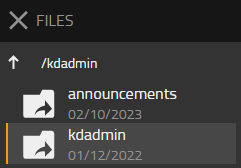
- Drag and drop the original audio file (mp3 or wav) into the kdadmin folder
- Drag and drop the contents of the unarchived zip file containing the different codecs into the kdadmin folder
- Give the PBX-Designer a moment to detect the new audio files
- Open the PBX-Designer app and find your new audio file on the Audio Files page under System Settings

Data synchronization
When using the PBX-Designer and the AdminUI at the same time, there may be problems in synchronizing the data. Since both apps are accessing the PBX at this moment, one of the two apps may display an out-of-date status of information.
To avoid errors, both apps should not be used at the same time.
If information is not visible in the PBX-Designer, this could be due to this. Restarting the PBX-Designer will re-read the information from the PBX.
Audio files are not displayed after update
From version >13r3 240724 sr15, the folder structure for audio files has been changed.
This means that the “pbx-designer” folder will be used instead of “kdamin” within the Files app in future.
There is nothing to note for a first-time or new installation.
However, when updating to version >13r3 240724 sr15, manual adjustments must be made once if audio files were previously used via the app.
1. If audio files have already been set up using the new version, copy the files from the new folder to the old folder.
2. Delete the new “pbx-designer” folder
3. Rename the old folder to “pbx-designer
4. If any call flows were created or edited after the update with a new audio file, open those call flows and save them.
This will set the correct file in the URLs.
Contact
| ITM Distribution GmbH |
| Bussardweg 13 |
| 41468 Neuss Germany |
| Tel: +49 (2131) 88141 0 |
| Mail: Sales@ITM-Distribution.de |