Howto:Algo 8301 IP Paging Adapter - Algo - 3rd Party Product

Product Name
Algo 8301 IP Paging Adapter & Scheduler
Certification Status

|
Interoperability tests between innovaphone PBX systems and end devices of Algo Communication Products Ltd. confirmed the telephony functions according to the detailed manufacturer's results documented below. The tests were carried out using the firmware versions specified below. |
| This interoperability test suite was last time performed in April 2026. |
Category
SIP hardware and software endpoints
Vendor
Algo Communication Products Ltd. is a manufacturer of network-based IP endpoints for voice paging, emergency alerting, visual notification, intercom, and secure door entry applications. Algo products are designed for integration with unified communications, collaboration, and mass notification platforms. The company’s portfolio includes IP speakers, paging adapters, intercoms, visual alerters, display speakers, and endpoint management tools for commercial, education, healthcare, transportation, and industrial environments.
Description
The Algo 8301 IP Paging Adapter & Scheduler is a wideband SIP paging adapter designed to connect traditional analog amplifiers and legacy paging infrastructure to modern IP-based communication environments.
The 8301 emulates a page port similar to what is found on a legacy PBX or key system, allowing a traditional amplifier to be integrated into a VoIP or unified communications environment. This enables organizations to retain existing analog speaker infrastructure while adding SIP paging, multicast distribution, scheduled bells, automated announcements, emergency notifications, and other IP-based communication capabilities.
The device includes a balanced and isolated line output to reduce hum and noise when connected to an amplifier, and it also supports multicast audio transmission to additional Algo IP endpoints and compatible multicast-enabled phones. The 8301 is appropriate for education, retail, manufacturing, transportation, healthcare, and other environments where hybrid analog and IP paging is required.
Functions
The Algo 8301 IP Paging Adapter & Scheduler supports a range of functions for paging, alerting, scheduling, and hybrid analog/IP deployments.
Core functions include:
- SIP-based voice paging through registration as a 3rd-party SIP endpoint
- Integration of traditional analog amplifiers into IP and UC environments
- Scheduled bells, tones, and automated announcements synchronized to NTP
- Emergency, safety, security, and customer service audio notifications
- Multicast transmission to Algo IP speakers, paging adapters, display speakers, and compatible multicast-enabled phones
- Ring, page, and alert extension support
- Relay input and relay output support for connected accessories and external triggers
- Music input and background audio distribution
- Web interface configuration and centralized provisioning support
The 8301 can be deployed either as a SIP extension or as a multicast endpoint, depending on the communication design. In hybrid systems, it can provide local analog paging output while simultaneously distributing audio to IP endpoints over the network.
innovaphone CTI ready
n.a.
innovaphone Reverse Proxy ready
Yes. Testing was performed in an innovaphone myApps Cloud environment using registration via the cloud reverse proxy. In the innovaphone user object, the hardware ID must match the Authentication ID configured on the Algo device, and Reverse Proxy plus Media Relay must be enabled. The validated setup used STUN, while TURN and ICE were not used. SIP over TCP was validated. SIP over UDP and SIP over TLS were available but not fully validated in this test case.
- STUN yes
- TURN no
- ICE no
- SIP/TCP yes
- SIP UDP yes (not tested)
- SIP/TLS yes (not tested)
innovaphone WebRTC ready
yes, the device supports SRTP, SDES-DTLS
Supported Codecs
- G.722 yes
- G.711 A-law yes
- G.711 u-law yes
DTMF Support
- RTP DTMF (RFC2833)
Supports RFC3261 Digest Authentication Scheme (Section 22.4)
Support LDAP Phonebook
n.a.
Version
Product versions used for interop testing:
- Algo 8301 IP Paging Adapter & Scheduler
- Algo 8186 SIP Horn
- Algo 8180 SIP Audio Alerter (G2)
- Algo 8128 (G2) SIP Strobe Light
- Algo 8201 SIP PoE Intercom
- Algo firmware requirement: version 5.4 or later
- innovaphone firmware / software version: innovaphone myApps Cloud IPVA, V15r1sr11
These devices represent Algo IP speakers, paging adapters, visual alerters, and door phones, and similar registration steps apply across Algo SIP endpoints.
Configuration
Algo SIP endpoints can register to innovaphone as 3rd-party SIP endpoints for voice paging, loud ringing, emergency alerting, visual notification, and secure door entry.
Interoperability testing was conducted using the Algo 8301 IP Paging Adapter & Scheduler, 8186 SIP Horn, 8180 SIP Audio Alerter (G2), 8128 (G2) SIP Strobe Light, and 8201 SIP PoE Intercom. These represent Algo IP speakers, paging adapters, visual alerters, and door phones, and similar registration steps apply to all devices.
Algo firmware requirements
All Algo devices must be running firmware version 5.4 or later. The current firmware version can be verified on the device and can be updated in System -> Firmware tab.
Algo device configuration
- Log in to the Algo device web interface. The device's IP address can be found by using an IP scanner tool such as Angry IP Scanner which is free and open-source.
- Go to Basic Settings -> SIP.

algo_sip_settings.png/
- Enter the SIP credentials under Base/Page using the values from innovaphone dashboard:
- SIP Domain (Proxy Server): innovaphone System ID
- SIP Extension: extension from innovaphone
- Authentication ID: SIP username from innovaphone
- Authentication Password: SIP password from innovaphone
- Select Save.
- Go to Advanced Settings -> Advanced SIP.
- Set SIP Transportation to TCP.
- Set the Outbound Proxy to the DNS name of the innovaphone system. Example: algosolutions-p.innovaphone.com
- Set SDP SRTP to Optional and AES CM 128 HMAC SHA1 80.
- Set STUN to stun.innovaphone.com.
- Select Save.

algosipsettings2.png/
- Go to the Status tab and verify that the configured extensions have registered correctly.


Configuration of the innovaphone user objects in innovaphone myApps
- Open the Users Admin App.

usersadmin.png/ - Create the user account for the Algo device. In this example we created a User account for Algo8180 and Algo8181.
- In the Devices table of the user account, make sure the hardware ID is the same as the Authentication ID used in the Algo device.
- Ensure that Reverse Proxy and Media Relay are enabled.

innovaphone_config_status.png/ 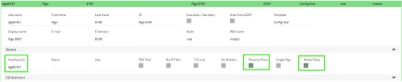
status_confirmation.png/ - Or, if preferred, the configuration can also be completed using the Advanced GUI, as shown in the example below.
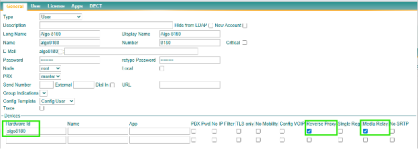
innovaphone_config_status2.png/ - Registration of the Algo device can then be checked within the innovaphone system.

innovaphone_config_status_using_gui.png/


The same SIP registration workflow applies across Algo IP speakers, paging adapters, visual alerters, and intercoms. Device-specific behaviour and options depend on the endpoint and deployment.
Summary
Algo SIP endpoints can integrate with innovaphone as 3rd-party SIP endpoints across key endpoint categories, including paging adapters, IP speakers, visual alerters, and intercoms.
Interoperability in this validation scope was performed using the Algo 8301, 8186, 8180, 8128, and 8201. Similar SIP registration steps apply across these devices, with product-specific options such as analog paging output, multicast, visual alerting, door entry, or local audio behaviour configured according to the endpoint type.
Contact
| Algo Communication Products Ltd. |
| Burnaby, BC, Canada |
| Tel: +1 604-454-3790 |
| Support: +1 604-454-3792 |
| Mail: info@algosolutions.com |
For additional information please refer to our contact page.