Uncategorized files
Jump to navigation
Jump to search
Showing below up to 50 results in range #1,951 to #2,000.
-
 Howto-Quescom Mobility Services Pack - SIP Testreport Quescom 8.png 805 × 254; 18 KB
-
 Howto-Quescom Mobility Services Pack - SIP Testreport Quescom 9.png 699 × 467; 37 KB
-
 Howto-Quescom Mobility Services Pack Shemaquescom.png 1,222 × 920; 31 KB
-
 Howto-Quescom Mobility Services Pack quescom.pdf 0 × 0; 2.66 MB
-
 Howto-Rules for successful IP1200 deployment Dect1.PNG 803 × 311; 16 KB
-
 Howto-SAMwin CCO samiwn .png 240 × 68; 15 KB
-
 Howto-SIP Interworking Interoperability HiPath 4000 Hipath3.png 748 × 574; 36 KB
-
 Howto-SIP Interworking Interoperability HiPath 4000 Sip hiptah1.png 2,274 × 1,516; 61 KB
-
 Howto-Tele2 (Austria) SIP Provider Compatibility Test Tele2 1.png 912 × 583; 41 KB
-
 Howto-Tele2 (Austria) SIP Provider Compatibility Test Tele2 sip.png 554 × 639; 32 KB
-
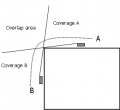 Howto-Understanding DECT handover with IP1200 Handover01.PNG 305 × 280; 5 KB
-
 Howto-Understanding DECT handover with IP1200 Handover02.PNG 252 × 187; 4 KB
-
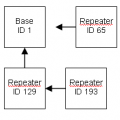 Howto-Understanding DECT handover with IP1200 Handover04.PNG 211 × 211; 3 KB
-
 Howto-Understanding DECT handover with IP1200 Handover05.PNG 207 × 302; 4 KB
-
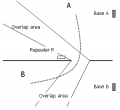 Howto-Understanding DECT handover with IP1200 Handover06.PNG 315 × 288; 7 KB
-
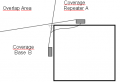 Howto-Understanding DECT handover with IP1200 Handover07.PNG 389 × 266; 6 KB
-
 Howto-V7 News V7-news de.zip ; 822 KB
-
Howto-V7 News V7-news en.zip ; 1,008 KB
-
 Howto-qsig-v6-image1-scenario.gif 615 × 346; 13 KB
-
 Howto-softphone register-phones.png 1,266 × 325; 26 KB
-
 Howto-softphone registration-success.png 1,254 × 204; 15 KB
-
 Howto-softphone select-users.png 1,251 × 315; 22 KB
-

-
-

-

-

-

-
-

-

-
-

-

-

-

-

-

-

-
-

-

-

-

-
-

-

-
-

-



_SIP_Provider_Compatibility_Test_Tele2_1.png)
_SIP_Provider_Compatibility_Test_Tele2_sip.png)


-Share_files_in_FilesApp_via_Fileskey-create_folder.png)


-Share_files_in_FilesApp_via_Fileskey-copy_files.png)
-Share_files_in_FilesApp_via_Fileskey-create_folder.png)
-Share_files_in_FilesApp_via_Fileskey-open_folder.png)
-Share_files_in_FilesApp_via_Fileskey-rename_folder.png)
-Share_files_in_FilesApp_via_Fileskey-select_folder.png)
-Share_files_in_FilesApp_via_Fileskey-share2_folder.png)
-Share_files_in_FilesApp_via_Fileskey-share_folder.png)
-Share_files_in_FilesApp_via_Fileskey-share_link.png)


